Manual Schema Annotation
The Schema Annotation can be done manually for each column by defining its semantic data. Simply click
the  icon of a column to open the Manage Metadata Column dialog.
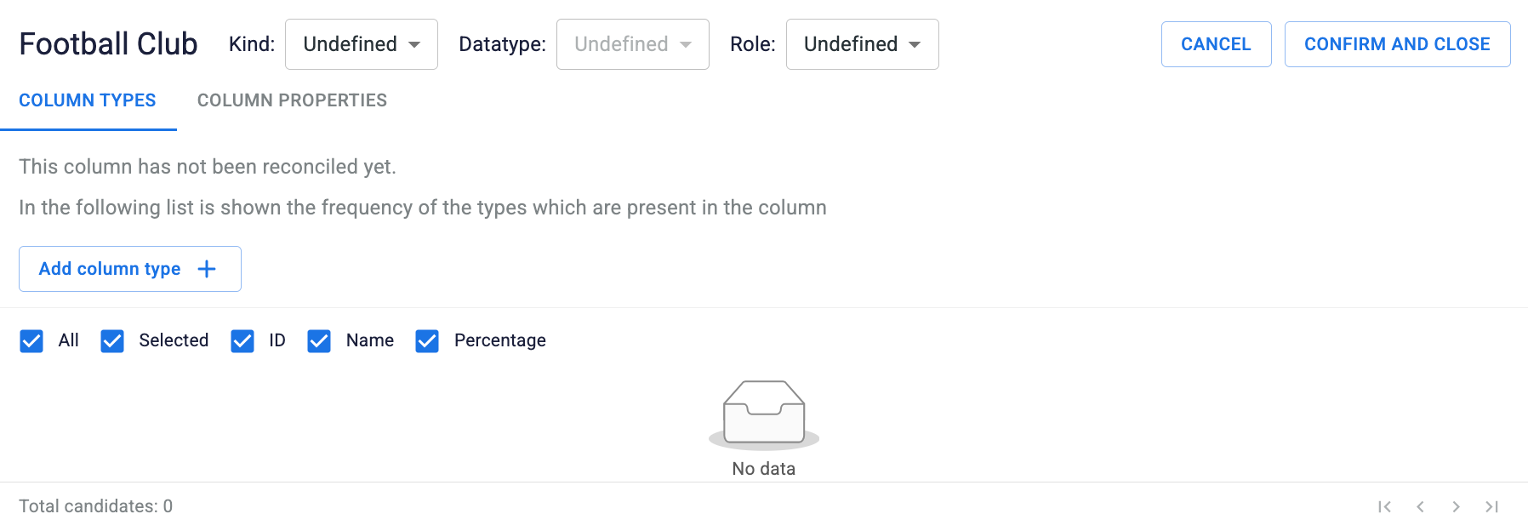
The first crucial choice determines how the systems treats your data:
- Literal, if the column contains raw values like numbers, dates, or text strings.
- Named Entity, if the column contains real-world entities (e.g., people, cities).
Once specified the Kind, define its specific classification:
- Datatype (for Literal): It distinguishes between NUMBER, DATE, or STRING;
- Semantic Class (for Named Entity): It distinguishes between PERSON, PLACE, ORGANIZATION, EVENT, or OTHER;
Adding a Column Type
Simply click on the Add column type button to add a specific type. Browse external knowledge bases, such as Wikidata,
to search for the desired type and fill in the required input.
When working with literal datatypes, SemT-X provides tailored tools to handle formatting and scales:
- QUDT Ontology (for NUMBER): Search and assign official units of measure (e.g., Count, Length, Degree Celsius). For more details, click here.
- XML Schema (for STRING/DATE): Aligns data validation with standard XML Schema structures. For more details, click here.
note
Column types are automatically added during a reconciliation or extension step. In this case, based on the property extracted, some information are automatically defined, such as column types and cell metadata are automatically added.
Adding a Column Property
Simply click on the Add column property button to add a specific property. Browse external property lists, such as Wikidata
and Schema.org, filtered automatically according to the current schema.
Manually adding properties links columns together by defining the following semantic triple:

tip
As properties can only be assigned to Entity column, Literal columns can only be selected as Object. When dealing with Literal columns, simply define the Subject by choosing from the Entity columns; the property will be automatically created and added to that corresponding Subject column.
note
Column properties are automatically added when providing support columns as context during the reconciliation step, and also, during the extension step, when extracting additional information.